Flyball Hub: Building an Offline-First Team Management App
Flyball Hub is the biggest passion project I have worked on. What started as an idea to help my own flyball team has grown into a web, iOS and Android app that is now approaching 1,000 users.
It has taken a lot of evenings, weekends and problem-solving. It has also taught me more about building real products than any tutorial or smaller side project could.

Why I started Flyball Hub
I train and compete in flyball with my Border Collies, Sky and Floss, as part of the Deathly Howlers. The sport is fast and competitive, but the community around it is just as important.
A flyball team becomes a kind of extended family. That also means plenty of organising: dogs, members, training sessions, availability, competition line-ups, jobs, timings and last-minute updates.
A lot of that information was spread across spreadsheets, messages and separate tools. I wanted to build one place that understood how a flyball team actually works.
From a side project to a real product
The first version was much smaller. I expected to build a useful progressive web app, share it with a few teams and see what happened.
Instead, people started using it, asking questions and suggesting improvements. I kept building. Flyball Hub now has users around the world and is approaching the 1,000-user mark.
I have put more hours into it than I could sensibly count. That work feels worthwhile because it solves problems for a community I am part of, rather than being a demo built around an imaginary brief.
What the app does today
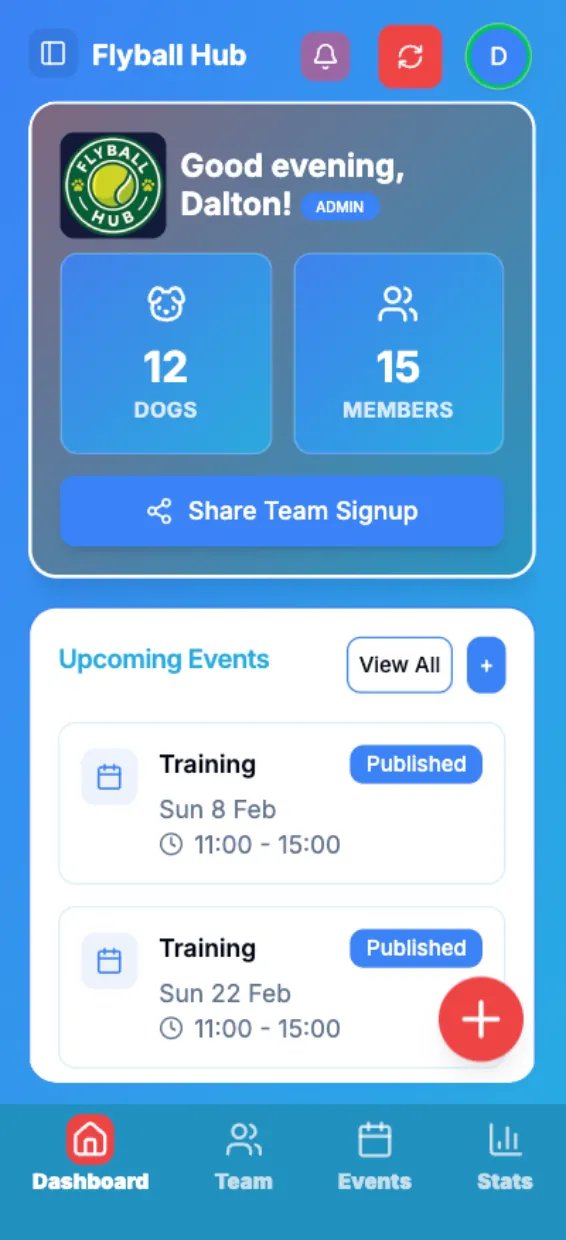
Flyball Hub gives teams a shared workspace for the practical work that happens between training nights and race days.
- Create a team, invite members and manage roles and permissions.
- Keep dog profiles, ownership details, league points and sub-team assignments together.
- Plan training sessions, general events and competitions with member and dog RSVPs.
- Build competition line-ups, assign race-day jobs and record individual or team times.
- Run heats in Race Mode and save results back to team statistics.
- Measure dog splits from local race video with frame-level timing controls.
- Review performance trends, leaderboards, personal bests and clean-run rates.
- Discover public events, apply for entry or host an event with structured entry management.
- Share announcements, notifications and Premium Team Chat across the team.
The free version covers the core team-management work. Premium supports the running costs and unlocks more advanced tools such as video timing, deeper statistics, repeated events and public event hosting.
Learning to build a real app
I had to stop thinking of Flyball Hub as a collection of pages. It is a product, and people need to be able to trust it.
A team captain and a normal member should not see the same controls. A failed database write cannot quietly look successful. A date entered in the UK should not shift backwards for someone in another time zone.
Those details are not as visible as a new feature, but they decide whether people can trust the app.
Offline-first from day one
Flyball competitions are not ideal places to depend on a perfect internet connection. Venues can have weak mobile signal, crowded networks or no useful connection at all.
Offline support therefore had to be part of the architecture, not something I bolted on later. The app caches useful data locally and queues supported changes so they can be retried when a connection returns.
I have spent a lot of time improving optimistic updates, persisted queries, reconnect behaviour and app-resume recovery. The difficult part is making the app feel quick without pretending a failed save worked.
Performance as a product feature
Performance has been a priority since the first version. Flyball Hub holds a growing amount of team, dog, event and timing data, but most users only need a small part of it on any one screen.
I have worked to avoid loading entire histories, reduce unnecessary client work and keep cached screens useful. Cursor pagination, focused queries and careful invalidation help the app stay responsive as teams add more data.
I want the app to open quickly beside a flyball ring, even on an older phone or an unreliable connection.
The technical approach
The app uses Next.js and TypeScript, with Supabase providing Postgres, authentication, storage and row-level security. Tailwind CSS and reusable components keep the interface consistent across a large product.
TanStack Query handles server state, caching, optimistic updates and persisted offline data. Zustand is limited to interface state, while Serwist provides the progressive web app and service-worker layer.
Capacitor wraps the same product for iOS and Android. This lets me share the main application while still supporting native capabilities, App Store releases, Google Play releases, push notifications and device-specific behaviour.
The web app and supporting services are deployed through Vercel and Supabase. Automated workflows help build and distribute native releases without turning every update into a manual process.
Keeping it affordable for teams
Flyball is already an expensive hobby once training, travel, equipment and competition fees are included. I do not want team software to become another large overhead.
That has shaped both the product and its infrastructure. I try to keep the useful team-management foundation free and make the paid tier a reasonably priced way to access advanced tools and support continued development.
I now think carefully before adding another service or dependency. Before I add one, I weigh the build time against its ongoing hosting and maintenance cost.
Learning by talking to users
Some of the best improvements have come from conversations with people using Flyball Hub in real teams. They notice confusing language, missing steps and awkward race-day workflows that are easy to miss while developing alone.
I have learned to ask what problem sits behind a feature request. Sometimes the answer is a new tool. Often it is clearer onboarding, a better empty state or making an existing feature easier to discover.
That feedback loop has changed how I plan work. Shipping is only the start. I need to watch how a feature behaves, listen to the people using it and be willing to simplify it.
What I have learned
Flyball Hub has pushed me far beyond building interfaces. I have had to think about product decisions, permissions, billing, database safety, native releases, localisation, accessibility, support and long-term maintenance.
I have also learned that reliability work matters. Fixing a reconnect edge case may not produce an exciting screenshot, but it can be more valuable than adding another feature.
The biggest lesson has been how much care a real app requires. Approaching 1,000 users brings a much wider range of devices, expectations and ways of using something I originally designed for myself.
Where Flyball Hub is now
Flyball Hub is still active and changing. I train and compete, speak with users and use what I learn to decide what should improve next.
There is plenty left to do, but I am proud of how far it has come. It combines my work as a developer with a sport and community I genuinely care about.